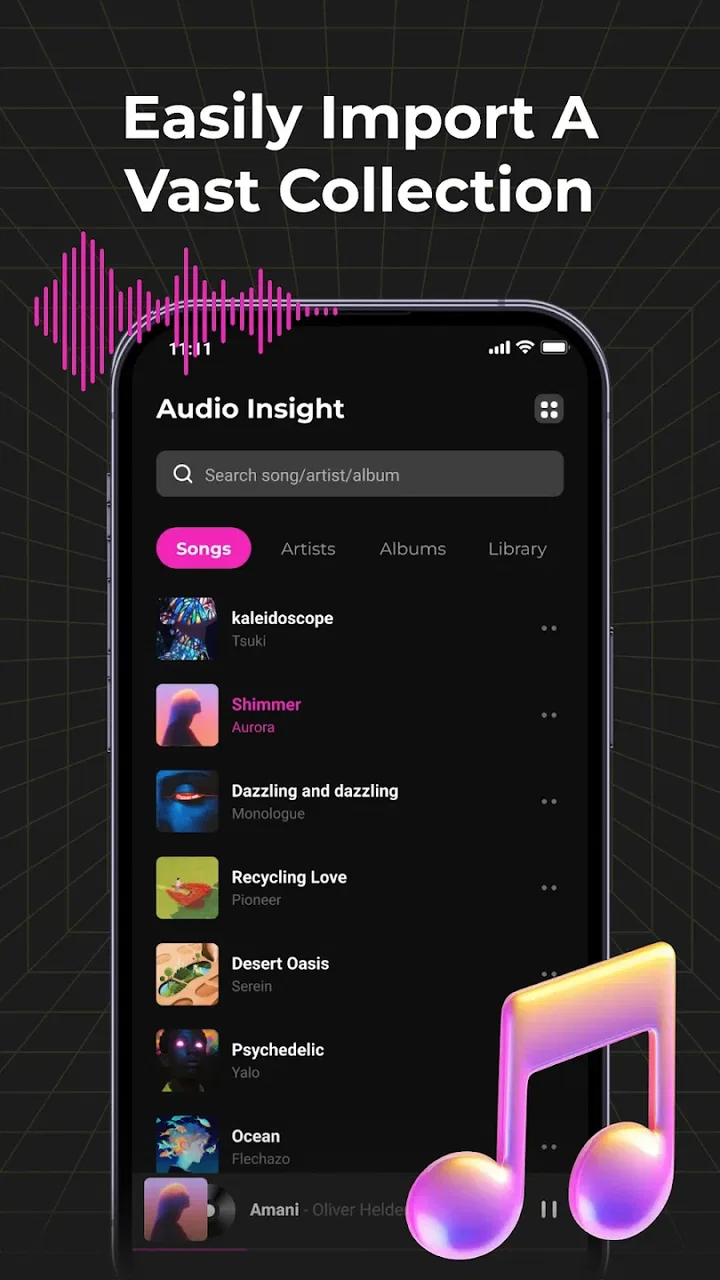
Audio Insight - Offline Music
- 4.2
- Rating
- 10.00M
- Installs
- Free
- Price

 Analysis by App-foxy
I approached Audio Insight as the kind of app you open when you want your own music files to work without depending on a connection. It is a free Music & Audio app from Photos & Videos Download Tools, aimed at offline listening, travel, and workouts. Its central promise is simple: bring your audio into one place and play it in the formats your device can handle.
That simplicity is also the reason to look at it carefully. This is not the same experience as joining a streaming service, searching a huge online catalog, or discovering algorithmic playlists. I found its appeal in control and convenience rather than discovery. If you already keep music, podcasts, recordings, or other audio on your phone, the app gives that collection a more focused listening home.
The app has an average rating of 4.2 from around 6,200 ratings and has passed 10 million installs, so it is clearly not an obscure experiment. It is free and rated for Everyone, which makes it approachable for households and casual listeners. Still, popularity does not automatically make every local music library tidy or every file easy to find. Your first few minutes with it matter.
You May Also Like

 Blood Strike: 2.5 Anniversary
Blood Strike’s Loadouts Turn Every Drop Into a Tactical Gamble
A close look at Blood Strike’s custom loadouts: how fast access to signature weapons reshapes its battle royale rhythm, rewards preparation, and narrows the gap between fights.

 Pandora - Music & Podcasts
Pandora’s Music Is Easy to Start, but Harder to Recover
Pandora’s strength is its low-effort path from a seed to a station. Its weak spot is how much confidence it asks you to place in connection, setup, and quiet recovery.

 8 Ball Pool
 Is Built on Rivalries, Rematches, and Routine
A close look at the rivalries, rematches, shared routines, and unanswered safety questions that turn a quick pool match into a persistent mobile community.

 Samsung Music
’s Quiet Strength Is Playing What You Already Own
Its reach comes less from spectacle than from dependable access to a personal library. That simplicity is both the app’s strongest retention engine and its ceiling.

 AccuWeather: Weather Radar
AccuWeather Review: A Quick, Clear Forecast for Everyday Decisions
For everyday plans, the best forecast is the one you can understand quickly. AccuWeather makes rain timing, radar, and local conditions easy to act on, with a few trade-offs.

 Hill Climb Racing
Why Hill Climb Racing Still Turns Crashes Into One More Run
A tiny car, a bumpy hill and one more upgrade: Hill Climb Racing keeps resurfacing because its simple chaos makes every near-miss feel personal.
More From Our News Desk



Getting from installation to a useful first listen
I’d begin with a small, familiar set of audio rather than moving an entire collection at once. That makes it easier to judge whether the player fits your routine and spot any file that needs attention before you depend on it. Once that first listen feels reliable, the next step is shaping a library you can navigate without fuss.
What to expect before you press play
The first thing I would set correctly is your expectation. Audio Insight is best understood as an offline music player, not a replacement for a streaming subscription. You should arrive with audio already available on the device, or with a clear plan for moving your own files there through the normal file tools you use. The app’s value begins once there is something local to play.
That makes it a practical choice for a flight, a commute through unreliable coverage, a workout where you do not want to handle a data connection, or a trip where you prefer not to keep streaming. It also suits people who have music from several sources and do not want to switch between separate apps just to hear different files.
The phrase “play any format” should be treated as a useful goal rather than a guarantee that every unusual file will behave identically. Audio files can differ in encoding, metadata, naming, and quality. A familiar format is likely to be less troublesome than an obscure one, and a file that is damaged or incomplete can still fail in any player. I would test important travel audio before leaving rather than assuming that a single tap proves everything works.
There is another important trade-off. Streaming apps are usually better at finding new music, remembering cloud libraries, and building recommendations. Audio Insight is more attractive when you already know what you want to hear. That distinction prevents a common disappointment: installing it while expecting a catalog, then discovering that its strength is local playback instead.
First setup: make the library easier to use
After installation, I would begin with a small, representative part of my collection instead of importing everything at once. Choose a few tracks, one longer recording, and perhaps a file whose format you regularly use. This creates a quick test of playback and makes it easier to spot how the app presents your library.
Keep your phone’s folders reasonably organized before opening the player. Clear names such as artist and title are more helpful than a directory full of automatic filenames. If your collection contains duplicate downloads, old edits, or several versions of the same recording, sorting that out first saves more time than trying to fix the whole library from inside a player.
I also recommend preparing a travel folder and a workout folder. This is a more useful workflow than treating the app as one giant pile of audio. A travel folder can contain albums and longer listening, while a workout folder can contain only the tracks you want during exercise. The benefit is not flashy; it is that you spend less time searching when your hands are busy or your attention is elsewhere.
Because the minimum operating system is Android 8.0 or later, compatibility is broad on Android devices that are still in regular use. The current version is 1.2.5. I would still check that the phone has enough free storage for the audio you intend to keep offline. A player cannot make a full collection convenient if the device is already crowded and files are constantly being moved or deleted.
Your first successful action should be deliberately small
For a reassuring first result, open one known audio file and let it play for a while instead of immediately building a large queue. Confirm that the sound is clear, that the expected track is selected, and that the controls respond as you expect. Once that works, try a second file from another folder. This simple sequence tells you more than quickly tapping through a long list.
My preferred first test is a short track followed by a longer recording. Short music confirms that ordinary playback starts quickly, while a longer file reveals whether the app fits the way you actually listen. Someone preparing lectures, language practice, audiobooks, or recorded meetings should not judge the player only by how it handles three-minute songs.
For workouts, I would create the listening order before starting the session. Searching for a track while moving is irritating and can interrupt the rhythm of exercise. A prepared selection also helps with battery-conscious listening because you are not repeatedly browsing, loading artwork, or switching between apps. The app’s offline focus is most useful when you remove decisions from the moment you need music.
One less obvious tip is to use consistent filenames as a backup for any in-app organization. If metadata is missing or inconsistent, a clear filename can make a file recognizable even when an artist or album field is not. This matters especially for personal recordings, downloaded mixes, and files created by different programs. The player can only display the information embedded in, or inferred from, what it can read.
Where new users may become confused
The most likely confusion is expecting online search. A local player may show nothing useful until audio is actually stored where the app can find it. If your first screen looks empty, do not assume the app is broken. Check whether the files are on the phone, whether they are in a location your file manager can identify, and whether you opened the correct collection or folder.
A second source of friction is the difference between a file existing on the device and a file being easy to browse. A folder can contain music that technically plays but is difficult to recognize because of generic names, missing artwork, or inconsistent tags. I would fix the worst offenders in the file manager rather than spending time blaming the player for a messy source library.
Format compatibility can create a similar misunderstanding. “Any format” is attractive wording, but real-world audio includes containers, codecs, variable encoding choices, and damaged files. If one item refuses to play while ordinary tracks work, test that item separately. Re-copying a complete file or converting an unusual file with a trusted tool may solve the issue; repeatedly reinstalling the player probably will not.
Another practical question is whether offline playback means the app downloads music for you. I would not treat it that way. The useful mental model is that Audio Insight plays audio you have already placed on the device. That makes it different from an offline mode inside a streaming service, where the service manages downloads and licensing within its own catalog.
People also often confuse a music player with a backup system. Keeping a file visible in the app does not replace storing a second copy somewhere safe. If the recording is important, retain it in your normal backup routine. The app is for listening, not for protecting irreplaceable audio from a lost or damaged phone.
How it compares with the usual alternatives
Compared with a streaming service, Audio Insight gives up discovery in exchange for independence from the service’s catalog and connection. That is a good trade for personal recordings, legally obtained files, offline collections, and audio you want available without repeatedly checking a subscription library. It is a poor trade if your main activity is searching for artists you do not already own or following constantly changing releases.
Compared with the basic player already installed on many phones, its advantage is focus. A dedicated audio app can feel less cluttered than a general media tool that mixes video, camera content, downloads, and recordings. Whether that difference is meaningful depends on your current phone. If the built-in player already handles your folders perfectly, switching may not improve much.
Compared with a file manager, Audio Insight is more suitable for sustained listening. File managers are excellent for moving, renaming, and deleting items, but they are not usually the most comfortable place to manage a listening session. I use the file manager for preparation and the player for playback. Separating those jobs keeps the library cleaner and reduces accidental file changes.
Compared with a specialized podcast or audiobook app, this player is more flexible for mixed personal audio but may be less tailored to long-form habits. A dedicated podcast app can be better when subscriptions, episode tracking, and automatic updates are central to your routine. Audio Insight makes more sense when the files are already yours and you want straightforward access without building that online workflow.
Useful routines for travel, exercise, and mixed collections
For travel, I would test the complete selection while the phone is still connected and then switch to the conditions in which I plan to listen. Put the device in the mode you normally use on a flight or in a weak-signal area, start a few files, and confirm that the experience remains comfortable. The point is not merely proving that a song opens; it is making sure your entire travel routine does not depend on last-minute searching.
For workouts, prepare a short queue with a clear beginning and end. A smaller selection is easier to control than a full library, especially if you use the phone while walking or exercising. I would also keep spoken audio separate from music so that a long recording does not appear unexpectedly in the middle of a training session.
For a mixed collection, divide content by purpose rather than only by file type. “Training,” “commute,” “language,” and “personal recordings” are more meaningful groups than a single folder called “audio.” This approach is particularly helpful when the app is serving several roles on the same phone. It turns a general player into a repeatable daily tool without requiring complicated maintenance.
A further trade-off concerns storage. Keeping a large offline library is convenient, but it occupies local space and can make browsing less pleasant. I would keep frequently used material on the phone and archive rarely played files elsewhere. That gives the app a focused collection and makes the next successful action—finding something quickly—more likely.
Who should use it, and who should skip it
I think Audio Insight is a strong fit for someone who already owns audio files and wants a simple way to listen during travel, exercise, or periods without reliable internet. It is also useful for listeners with personal recordings or collections assembled outside a single streaming ecosystem. The free price removes the need to make a financial commitment just to test whether local playback suits you.
It is less suitable for a person whose music life begins with a search box and ends with recommendations. If you want instant access to a broad online catalog, social discovery, synchronized streaming libraries, or service-managed offline downloads, a conventional streaming platform will probably feel more natural. Installing this app will not change a local collection into an online catalog.
I would also be cautious if your entire library depends on unusual or damaged formats. The app’s broad format promise is appealing, but no player can remove the technical differences between every audio file. Test the files that matter most, especially before a trip. That small precaution is more realistic than assuming compatibility from a short description.
My next step after the first successful listen
Once a few files play correctly, I would stop experimenting and build one dependable routine. Create a clearly named selection for the situation you care about most, whether that is commuting, running, studying, or travel. Add only material you have tested. The goal is to make the next opening of the app almost automatic.
Then review the collection after a few days of normal use. Remove duplicates, rename files that slow you down, and move rarely used audio away from the everyday group. This is where the app becomes more valuable than a random folder of tracks: not because it creates music for you, but because it gives your existing audio a predictable place to live and play.
My overall impression is favorable, with a clear boundary. Audio Insight is a practical, free offline player for people who want control over local audio and do not need a streaming catalog. Its best qualities appear in ordinary moments—a workout with no signal, a flight where the right files are already ready, or a personal recording that deserves a straightforward player. Its main weakness is equally clear: the experience depends heavily on how well your own files are organized and supported.
For a first-time user, the safest path is simple: prepare a small folder, test one familiar file, try a longer recording, and only then bring in more of the collection. If that workflow matches the way you listen, this app can become a dependable part of your phone. If you mainly want discovery and online access, I would choose a different kind of music service instead.
With its Everyone age rating, Android 8.0 minimum, and broad reach, it is easy to try without much commitment. I would recommend it to a friend who says, “I already have the audio; I just want it to play properly offline.” That is the situation in which Audio Insight feels most convincing: not as a replacement for every music app, but as a focused tool for making your own audio available when and where you need it.
FAQs for Audio Insight - Offline Music
01What is Audio Insight - Offline Music?
Audio Insight - Offline Music is a versatile music player app designed for users who want to enjoy their music collection without an internet connection. The app supports various audio formats and offers an intuitive interface for easy navigation. With customizable playlists and equalizer settings, it enhances the overall listening experience.
02How do I download music to Audio Insight for offline listening?
Downloading music to Audio Insight involves syncing your existing music library from your device. The app scans your device for audio files and organizes them within its interface. Unfortunately, it doesn't support direct downloads from online sources, so you need to have the music files stored locally on your phone.
03What audio formats does Audio Insight support?
Audio Insight supports a wide range of audio formats, including MP3, AAC, FLAC, and WAV. This ensures compatibility with most music files you may have on your device. The app's robust format support means you can enjoy high-quality audio without worrying about conversion or compatibility issues.
04Does Audio Insight offer any sound customization options?
Yes, Audio Insight provides various sound customization features, such as a built-in equalizer with presets and manual settings. This allows users to tailor the audio output to their preferences, enhancing bass, treble, or other sound aspects. These options help create a personalized listening experience.
05Is Audio Insight - Offline Music free to use?
Audio Insight offers a free version with basic features, allowing users to play and organize their music offline. However, to access premium features like advanced equalizer settings and ad-free experience, users can opt for a paid upgrade. This tiered access model ensures that basic functionality remains accessible to all users.
Pros
- Intuitive interface for easy navigation.
- Works offline for uninterrupted listening.
- High-quality audio playback support.
- Customizable playlists and equalizer settings.
- No ads interrupting your music experience.
Cons
- Limited to local music files only.
- No streaming or online radio features.
- Lacks social sharing options.
- No lyrics integration available.
- Updates are infrequent and limited.

Audio Insight - Offline Music
Gallery